When Should You Choose Custom Ecommerce Over Shopify or WooCommerce?
When Shopify or WooCommerce is enough, when to extend them, and when complex pricing, workflow or integration rules justify a custom ecommerce platform.
A practical guide to eCommerce development - choosing the right platform, planning a custom build, and the integrations that turn a storefront into a real sales channel.
eCommerce development covers more ground than picking a platform and installing a theme. It spans platform selection, custom storefront and checkout engineering, catalog and inventory architecture, and the integrations that connect your store to payments, fulfillment, and the rest of your operational stack. This guide walks through how IDOWS Apex approaches each stage, and points to the specific platform and service pages relevant to your build.
What separates storefronts that convert from storefronts that just look good
We build on Shopify, Magento, OpenCart, and Wix, and recommend based on your catalog and growth plan - not whichever platform we happen to specialize in.
Every storefront decision is evaluated against checkout friction and page speed, because a beautiful store that loads slowly loses more revenue than a plain one that loads fast.
Platform migrations include a full URL redirect map and historical data transfer, so you keep the search rankings and backlinks you've already earned.
We build storefronts assuming they'll need to talk to an ERP, CRM, or marketing platform eventually - not as an afterthought once the first integration request comes in.
When a platform's data model genuinely can't support your pricing or fulfillment logic, we build custom rather than forcing your business into a workaround.
We stay on after launch for platform upgrades, security patching, and seasonal traffic scaling, so peak sales periods don't become incident response drills.
How the work actually runs, from first conversation through to what happens after launch.
We evaluate your product catalog complexity, pricing logic, and fulfillment workflow to determine whether a platform build or custom development is the right fit.
Where a platform makes sense, we match Shopify, Magento, OpenCart, or Wix against your catalog size, B2B needs, and existing tooling rather than defaulting to the most popular option.
We design the browsing, product, and checkout experience around conversion - minimizing friction at every step where a customer could abandon a purchase.
Development covers the storefront itself plus the integrations that make it operational: payments, tax, shipping, inventory sync, and CRM or ERP connections.
For existing stores, we execute the platform migration with a full redirect map and data transfer so search rankings and customer history carry over intact.
Post-launch, we monitor page speed and checkout conversion, treating both as revenue metrics worth continuous testing rather than one-time launch checkboxes.
The platforms and tooling behind every storefront we build
The storefront is the visible tenth of it. Underneath sits the catalog and its variants, the pricing rules, cart and order state, inventory positions, payment and tax handling, and the connections to whatever runs fulfillment and accounting. Most of the engineering effort, and almost all of the risk, sits in that second list.
Three terms get used interchangeably in briefs and mean quite different things once you start building. Which one you are actually describing determines the platform decision, the data model and roughly the whole budget.
One seller, one catalog, one price list
A storefront selling your own products at published prices. Most of the commerce work is catalog structure, checkout and fulfillment. A platform covers this well, and building it from scratch is rarely justified.
The software the store runs on
The engine underneath: catalog model, pricing rules, cart and order state, extension points. Platform development means extending or replacing parts of that engine rather than styling the storefront on top of it.
Known accounts, negotiated terms, internal workflow
An ordering system for people who already have a relationship with you - dealers, wholesale buyers, franchisees, procurement teams. Access is granted rather than open, prices are per-account rather than published, and an order often has to be approved before it becomes an order.
The distinction matters because the three fail differently. A store outgrows its platform when the catalog gets complicated; a portal outgrows it much earlier, usually on pricing or approvals. Naming which one you are building is the first useful thing to do.
Configuring a platform and building one produce the same five layers. The difference is how much of each you own. Knowing which layer a requirement belongs to is what stops a pricing rule ending up in a template, which is the single most common source of commerce technical debt.
The storefront, and increasingly more than one of them: web, mobile web, sometimes an internal ordering screen. If more than one surface needs the same catalog and pricing, that logic cannot live in the template layer.
Catalog rules, pricing, promotions, cart and order state machines. This is where the business actually differs from its competitors, and the layer platforms constrain most tightly.
Products, variants, customers, orders, inventory positions. The schema decisions here are the hardest to reverse later, which is why catalog modelling comes before storefront design in our process.
The boundary to ERP, CRM, payment, tax and carrier systems. Treated as a layer with its own error handling and retry behaviour rather than as calls scattered through controllers.
Hosting, caching, queues, search indexes, and the background workers that run stock sync and order export. Commerce traffic is spiky, so headroom is a design input rather than an afterthought.
An API-first arrangement - application logic exposed over an interface that any surface can call - is worth the extra indirection once there is genuinely more than one consumer of it. With a single storefront it is usually cost without return. The broader engineering discipline is covered under web development, and the hosting and scaling side under cloud development.
No platform is best in general - each trades control against operational burden differently. What follows is where each one genuinely fits, including where it stops fitting. We build on all six, which is why we are comfortable pointing you away from any of them.
| Platform | Best fit | Main strength | Main limitation |
|---|---|---|---|
| Shopify | Fast-growing DTC brands wanting managed infrastructure | Hosting, security patching and PCI scope handled for you; large app ecosystem | Checkout customization is constrained below Shopify Plus; platform fees scale with revenue |
| Magento | Large catalogs, B2B pricing, multi-store or multi-currency | Deepest native B2B and catalog modelling of the mainstream platforms | Highest operational and hosting burden; needs real infrastructure attention |
| WooCommerce | Teams already on WordPress, or wanting full code ownership | Open source and self-hosted; no transaction fees; unlimited customization via hooks | You own hosting, updates and performance work that a hosted platform absorbs |
| OpenCart | Cost-conscious catalogs wanting self-hosted flexibility | Lightweight, straightforward to extend, low licensing overhead | Smaller ecosystem and community than the larger platforms |
| Odoo | Businesses wanting commerce inside a wider ERP | Store shares one data model with inventory, accounting and CRM | Weaker as a pure storefront than dedicated commerce platforms |
| Wix | Smaller catalogs prioritising speed of setup and content | Fastest route to a presentable, content-led store | Outgrown quickly by complex catalogs or unusual commerce logic |
Custom is not the sophisticated answer and platforms are not the cheap one. They are different trade-offs, and most real projects use two of the three at once - a configured platform for the catalog, an extension for the workflow that does not fit, and occasionally a built service behind it.
| Approach | Choose it when | It stops working when | What you carry |
|---|---|---|---|
| Configure | Your catalog and pricing fit the platform's model, and the differentiator is your product or brand rather than your process. | You start describing requirements as workarounds, or the answer to "can it do X" is a third-party app for every X. | Platform fees and its roadmap. Lowest engineering cost, least control. |
| Extend | The platform handles the catalog and checkout well, but one or two areas - pricing, approvals, allocation - need behaviour it does not model. | Extensions start fighting each other, or platform upgrades become projects because too much depends on internals. | Upgrade compatibility for everything you wrote. The usual middle ground, and the usual right answer. |
| Build | The commerce logic is the business - unusual pricing, entitlement or fulfillment rules no platform expresses - or platform fees have become a material line item. | It rarely stops working; it starts too early. Building before the rules are understood produces a bespoke version of a platform you could have configured. | Everything: payments, tax, security patching, upgrades. Highest control, highest ongoing obligation. |
A practical test: if you cannot describe the rule the platform breaks on, you are probably not ready to build yet. That conversation is worth having before the quote, not after.
Custom commerce work becomes justified in a few specific situations: when pricing or fulfillment rules cannot be expressed in any platform's data model, when a quote-to-order or approval workflow spans several systems, or when transaction volume makes platform fees a material line item rather than a rounding error.
It rarely means replacing the whole store. The more common pattern is a platform storefront with a custom service handling the part it cannot - a pricing engine, an allocation service, a partner-facing ordering portal - integrated behind the checkout the customer sees. That keeps the undifferentiated work on the platform and puts the engineering effort where it earns something.
Where that service becomes the substance of the project, it is custom software development - and the question of whether to build at all is worked through there. This guide covers how to choose; if you already know roughly what you need built, the store engineering work itself is described separately. We have also written up the decision itself in detail: when to choose custom ecommerce over Shopify or WooCommerce.
A portal sells to people you already have a relationship with. Dealers, wholesale accounts, franchisees, procurement teams inside a customer organisation. Nobody arrives from an ad and buys; they log in, see terms that were negotiated offline, and place an order that may need approving before it counts.
That inverts most storefront assumptions. Discovery matters less than reordering. Published price is replaced by entitlement. The interesting engineering moves from conversion to authorisation and workflow - which is why portals outgrow general-purpose platforms earlier than stores do, usually on pricing or approvals rather than on catalog size.
A buying organisation is not one user. Head office, branches and individual buyers need separate logins under a shared account, each seeing the catalogue and prices their level is entitled to.
Price is a function of who is asking, not a field on the product. Negotiated rates, volume breaks and customer-specific catalogues have to resolve per account, and cache correctly without leaking between them.
An order above a threshold becomes a request first. The cart has to hold state while it waits for a decision, and the approver needs a view that is not the shopper's view.
Payment on account, PO numbers and credit limits rather than a card at checkout. This changes the order state machine, because the order is confirmed before money moves.
Repeat buyers order the same lists repeatedly. Saved lists, reorder from history and CSV upload matter more than product discovery, which inverts the usual storefront priorities.
Which products, prices and documents each account can see. This is authorisation logic, and it belongs server-side rather than in a hidden storefront filter.
Not all of this needs building. Magento models B2B accounts, contract pricing and requisition lists natively, which is often the shortest route - Magento development covers that. Where the order has to originate or settle in an ERP, Odoo keeps commerce and inventory on one data model. Where the entitlement or approval logic is genuinely specific to how you trade, that part gets built as custom software and connected to whatever handles the catalog.
Integration scope is usually the largest single driver of an ecommerce budget, and the part most often underestimated at quoting time.
Gateway integration, and tax calculation that reflects where you actually sell. Getting tax wrong is a compliance problem, not a feature gap.
Stock synchronization between the store and the system of record, including who wins when the two disagree - the question most integrations skip and later regret.
Customer and order data flowing into the tools your marketing team already uses, so segmentation reflects real purchase behaviour.
Rate calculation at checkout, label generation, and status updates back to the customer from the carrier or 3PL.
Conversion and revenue tracking wired in deliberately, with consent handling, rather than assembled from whatever tags accumulated over time.
Everything the categories above do not cover - pricing services, loyalty schemes, partner feeds - built as interfaces with their own error handling.
The engineering behind these connections is our integrations practice; where the upstream system is an ERP, see ERP development.
Replatforming is mostly a data and URL exercise. The build is rarely what goes wrong.
The single highest-risk item. Product, category and content URLs need a complete redirect map, or existing rankings and inbound links are lost at cutover.
Variations, attributes and media rarely map one-to-one between platforms. The mapping is decided before anything moves, not discovered during it.
Accounts transfer, but password hashes usually cannot. Plan the reset communication as part of launch rather than as a surprise.
Historical orders matter for support, returns and accounting. Decide early whether they migrate fully or are archived for reference.
Every connected system needs re-pointing and re-testing. This is routinely underestimated and is where most migration overruns originate.
A staged rehearsal against real data, with a rollback path, before the DNS change - not a switch-over date and optimism.
Commerce performance is diagnosable rather than mysterious. We profile before changing anything, because the fix for a slow catalog page is not the fix for a slow checkout.
Image formats and sizing, script discipline, and the render path for category and product pages, where most stores lose their speed.
Catalog and order tables grow fast. Indexing and query work on the busiest paths usually gives the largest gain.
Page, object and edge caching, applied carefully so carts, accounts and customer-specific pricing never enter a shared cache.
Scheduling and batching synchronization traffic so a stock update job does not compete with shoppers for the same resources.
Where most of your traffic is mobile and the storefront is used repeatedly rather than once, a progressive web app (PWA) is worth weighing against a native app. It gives installability, offline-tolerant browsing and push notification support from the same codebase as the web store, without app-store distribution.
It is not automatically the right answer - it adds build complexity, and a well-optimised mobile store often performs comparably. See progressive web apps for how we assess the trade-off, and mobile development where a native application is genuinely warranted.
Headless means the storefront stops being part of the platform and becomes a separate application that calls it over an API. The catalog, cart and order logic stay where they are; the presentation layer is rebuilt, typically in React or Next.js, and talks to the commerce engine over REST or GraphQL.
It earns its cost in three situations: when the same catalog and pricing have to serve more than one surface, when the storefront needs to move faster than the platform's theming allows, or when front-end performance is a revenue problem the template layer cannot solve. Outside those, it mostly buys complexity.
What it costs is real. You now own the storefront outright - routing, SEO rendering, caching, previewing, and the build pipeline - and features the platform used to provide out of the box become yours to implement. Two systems have to be deployed and monitored instead of one. The trade is control and speed against operational surface, and it only makes sense once one of the three conditions above genuinely applies. Where mobile is the dominant surface, weigh it against a progressive web app first, which is the cheaper of the two answers.
A store holds payment flows, personal data and, on a portal, credit terms. These are the areas we review on a commerce build. None of it is a compliance certification - it is engineering practice, and where a formal standard applies to your business, the requirements come from your assessor rather than from us.
Session handling, password policy and multi-factor where accounts carry credit terms or purchasing authority. Account takeover on a portal is a commercial exposure, not just a support ticket.
Every price, document and order enforced server-side against the requesting account. The most common commerce vulnerability we find is an object reference that trusts an ID from the client.
Card data kept out of your systems by using the gateway's hosted fields or tokenisation, which narrows what you are responsible for rather than eliminating the obligation.
Order history and addresses are personal data. Retention, access and deletion need answers before launch, not when the first request arrives.
Storefront APIs are public whether or not they are documented. Rate limiting, authentication and field-level exposure get reviewed as part of the build.
Themes, plugins and extensions are the usual entry point on self-hosted platforms. Scanning on every build and a patching cadence you actually keep to.
The pipeline side of this - dependency scanning, secret handling and review gates - is covered under DevSecOps, and the verification side under software testing.
We do not publish a price for an ecommerce build, because the same brief produces very different numbers depending on the factors below. What we can do is tell you which of them apply to you before quoting, so the estimate is about your project rather than an average.
Variants, configurable products, per-account pricing and unit-of-measure rules. A thousand simple products is a smaller job than fifty products with complex option logic.
Usually the largest single driver, and the most underestimated. Each connected system is a contract, an error path and a test surface, not a checkbox.
Approvals, quoting, allocation and returns logic that the platform does not model natively. This is where custom engineering concentrates.
Whether history moves, how clean the source data is, and how many URLs need mapping. Data quality found late is the most common cause of an overrun.
A themed platform build and a bespoke storefront are different exercises. Both are legitimate; they are not the same budget.
Traffic peaks, uptime expectations, and reporting needs. These shape infrastructure and testing effort more than the feature list does.
The two that move estimates most after work starts are integration scope and source data quality on a migration. Both are knowable up front, which is why the assessment stage exists.
"eCommerce development" spans a much wider range of work than most businesses expect going in. At one end, it's picking a platform and configuring a theme - a project measured in weeks. At the other, it's a fully custom commerce engine with bespoke pricing logic, multi-warehouse fulfillment, and deep ERP integration - a project measured in months. Knowing which end of that spectrum your business actually needs is the difference between a store that ships on budget and one that either overspends on custom work it didn't need or under-delivers on a platform that can't support the business model.
For most catalogs, a platform is the right call. Shopify, Magento, OpenCart, and Wix each handle the undifferentiated heavy lifting - hosting, payment security, checkout compliance - so your team's effort goes into the product and customer experience instead of infrastructure. The right platform among those four depends less on feature checklists than on your catalog's complexity, your B2B or multi-currency needs, and how deeply you need to customize checkout and pricing logic. Custom development earns its cost only when a platform's underlying data model genuinely can't represent how your business actually sells - complex tiered pricing, unusual fulfillment splits, or a checkout flow no platform's app ecosystem can replicate.
Whichever path fits, a storefront is rarely the whole project. Payment and tax integrations are table stakes; inventory sync with a warehouse or ERP system, CRM connections for customer data, and marketing platform integrations are what turn a storefront into an operational sales channel instead of an isolated website. And if you're migrating an existing store, preserving your SEO rankings and order history through that migration matters as much as the new platform's feature set. The sections below cover our platform-specific practices and the supporting services - custom software, web engineering, and integrations - that make a commerce build complete.
Deep technical analysis, architectural case studies, and strategic perspectives from our senior development teams.

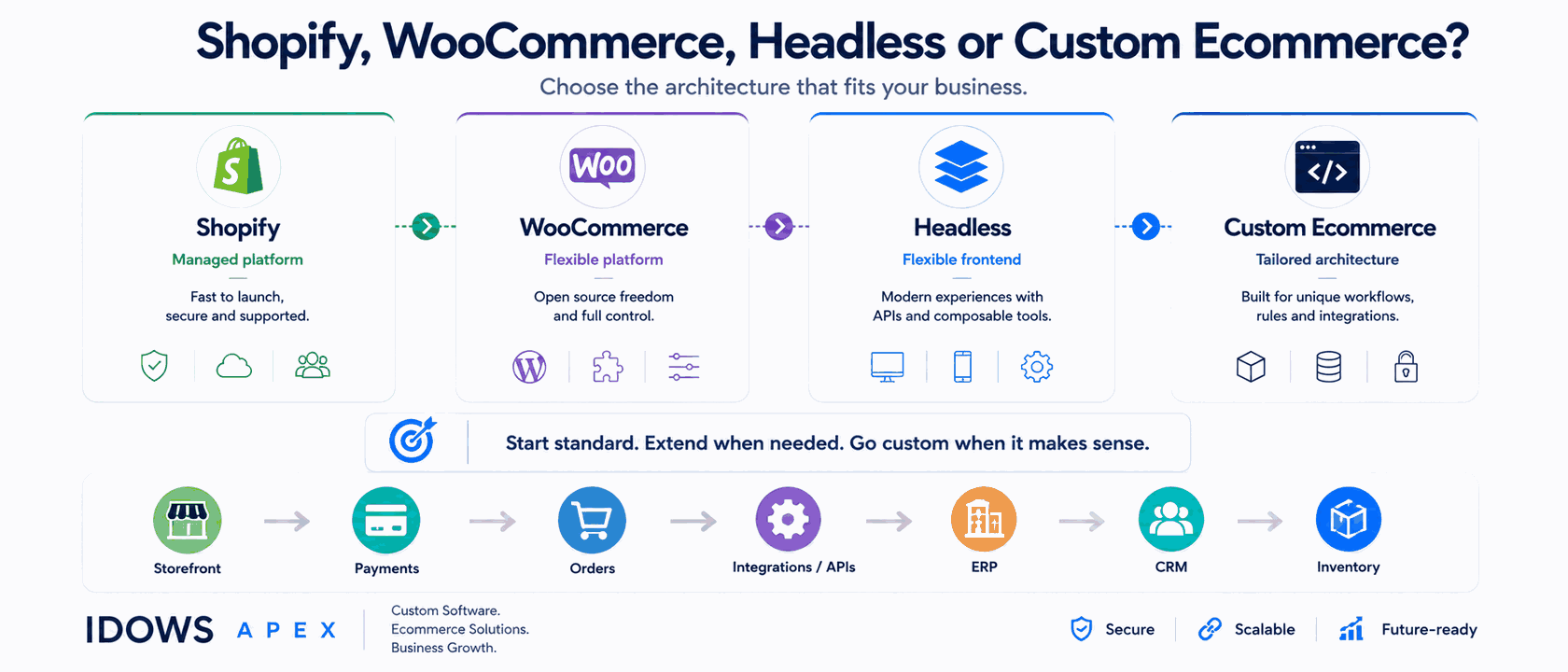
When Shopify or WooCommerce is enough, when to extend them, and when complex pricing, workflow or integration rules justify a custom ecommerce platform.

Every growing business faces the same decision: buy off-the-shelf or build custom? It's a strategic choice with massive consequences for your bottom line.

Most businesses treat design as a finishing step. That thinking costs customers and conversions - here's what design does for your bottom line.
Related work that often sits alongside this one in the same engagement.